


Fuel Forward
4.53.81K Reviews
App Specs
- Version
- 7.11.0
- Updated On
- License
- Free
- Downloads
- 1,000,000+
- Developer
- Phillips 66 Mobility
- Categories
- Auto & Vehicles
- Platform
- Android, iOS
Screenshots
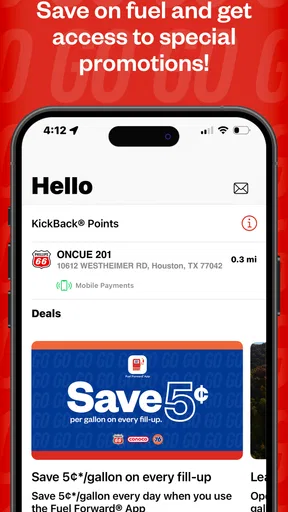
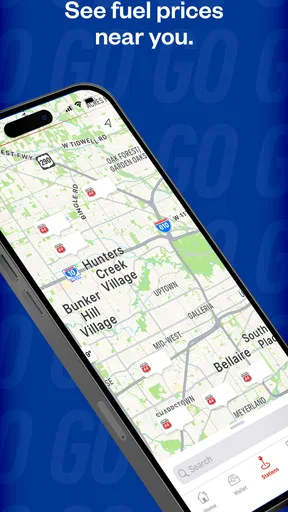
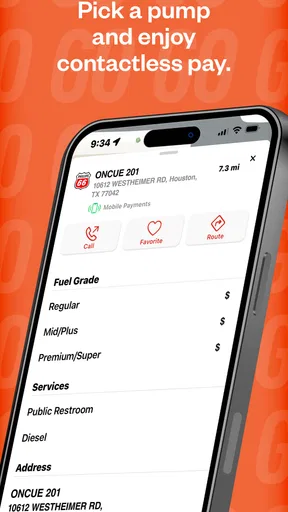
 Analysis by AppCompare
I found Fuel Forward most useful when I treated it as a practical companion for visits to Phillips 66®, Conoco® and 76® stations rather than as a general driving app. Developed by Phillips 66 Mobility, this free Auto & Vehicles app brings secure mobile payments and fuel savings into one place. That sounds simple, but the real value depends on how comfortably you can read, navigate and operate a phone while standing beside a pump, sitting in a car, or managing a busy refueling stop.
After spending time with it, my overall impression is positive but specific: it suits drivers who regularly use the participating station brands and want fewer payment steps. It is less compelling for someone who usually chooses whichever fuel station is closest, prefers cash, or wants a broad all-station navigation tool. I also paid close attention to how the experience works for different abilities and situations, because a payment app can feel very different when glare, gloves, limited dexterity, hearing differences or a rushed roadside stop enter the picture.
How Fuel Forward feels to read and navigate
The app’s purpose is easy to understand from the beginning. Its short name, Fuel Forward, points toward fuel-related tasks without trying to present itself as a full travel planner. The store summary focuses on secure mobile payments and fuel savings, and that narrow focus is helpful: I did not approach it expecting restaurant discovery, trip planning or a complete vehicle-management suite.
For a new user, the important mental model is straightforward. You are using the app around a Phillips 66, Conoco or 76 visit, with payment and savings as the main reasons to open it. That clarity can reduce cognitive load compared with apps that mix fuel prices, loyalty programs, maps, vehicle records and promotions into one crowded dashboard. At the same time, a focused app still requires attention at the right moment, especially when you are beside a pump and want to finish quickly.
I would describe the reading experience as best suited to people who can comfortably inspect a phone screen in ordinary conditions. Fuel stations are not always friendly reading environments: direct sunlight can wash out text, nighttime lighting can create glare, and a driver may be looking down only briefly. Anyone with low vision should check whether the current display and text settings on their device make the app comfortable before relying on it during a hurried stop.
That is one reason I recommend setting up the app before arriving at a station. Completing account and payment decisions while parked or at home gives you time to read labels, review prompts and understand the flow without a queue behind you. The app becomes much less demanding when the pump visit is used for the final action rather than the first attempt at configuration.
The developer, Phillips 66 Mobility, has kept the product closely tied to its fuel brands. That is useful because the context is clear, but it also means the app’s usefulness is location-dependent. I would not install it simply because I drive; I would install it after confirming that Phillips 66, Conoco or 76 stations are part of my normal routine. For occasional users, the extra app may not justify the setup.
Worth Reading Before You Choose

Flipboard Shows What News Apps Must Do Beyond the Feed

Switching to Android Auto Means Rethinking Your Driving Routine

Google Calendar Makes a Crowded Week Easier to Manage

Ludo King Makes the Most of the Minutes Between Plans

Baby Panda World Brings Quick Play to Modern Phones, but Its Game Library Feels Busy

ESPN’s Live Game View Makes Following Close Games Easier
Its audience is also reflected in the store’s mature seventeen-plus content rating. That does not tell me that the app is difficult to use, but it is a reminder that this is a payment-oriented service intended for mature users, not a child-focused tool. I would keep account access and payment decisions with the person responsible for the transaction.
Preparing the experience before the pump
My strongest practical recommendation is to separate preparation from refueling. When you have time, review the app’s available payment path and savings-related options, then make sure you know how you want to use it before pulling into a station. This is especially useful for people who need larger text, more time to process instructions or a calmer environment for entering information.
That preparation also helps users who experience anxiety around payment screens. A fuel stop often combines traffic noise, a running vehicle, unfamiliar equipment and pressure to move along. Learning the app at home removes several variables. If the app asks you to make a choice at the station, you are more likely to recognize it instead of treating every screen as an emergency decision.
I also prefer keeping the phone in a stable, reachable place rather than holding it while moving around the forecourt. The app is designed for a mobile payment context, but safe use still depends on the driver stopping appropriately and giving the screen full attention. The most accessible interface is not helpful if it encourages distracted movement near vehicles.
Motor, sensory and situational considerations
Fuel Forward can be convenient for people who find repeated card handling difficult. A mobile payment route may reduce the need to take a wallet from a pocket, insert a card into a pump reader or manage a card while handling a fuel nozzle. For someone with limited grip strength or reduced finger coordination, reducing physical exchanges can make the overall stop feel easier.
That benefit should not be overstated. A phone-based transaction still requires the user to unlock or access the device, tap controls and respond to whatever confirmation steps appear. If precise tapping is difficult, a user may find the digital route no easier than a physical card. The right choice depends on which action causes less strain: handling a card and pump interface, or operating the phone.
Gloves are another everyday complication. In cold weather, touchscreens may be less responsive through thick gloves, and removing them can be inconvenient for people with sensitive hands or limited dexterity. I would test the complete payment routine in a quiet setting and avoid assuming that “mobile” automatically means hands-free or touch-free.
For users with hearing differences, the safest approach is to rely on visible confirmation and keep an eye on the pump itself rather than depending on sounds from the phone or station. I would not treat an audible alert as the only sign that a transaction has progressed. Likewise, people who process visual information slowly may benefit from pausing between steps instead of tapping repeatedly when a screen appears to hesitate.
People with light sensitivity or migraine triggers may also need to consider the environment rather than the app alone. Bright station lighting, reflected sunlight and a glowing phone screen can combine into an uncomfortable experience. Lowering device brightness, choosing a shaded position when safe and preparing the transaction in advance can reduce the amount of time spent looking at the display.
For users with cognitive disabilities, the narrow purpose is a strength. The app is about fuel-related payment and savings at specific station brands, so it is easier to explain than a broad financial app with many unrelated functions. A trusted person could help establish the account and routine, after which the driver may only need a small number of familiar actions.
However, payment decisions deserve care. I would not hand a phone to another person without considering what account or payment information could be exposed. Shared-device situations can also create confusion about whose account is active. Families and caregivers should establish a simple routine that makes ownership and confirmation clear, rather than relying on memory during a busy stop.
A realistic stop in everyday use
Imagine leaving work late, stopping at a Conoco station and wanting to refuel without searching through a wallet. If Fuel Forward is already prepared, the useful part is that the phone is already the tool in your hand. You can focus on the station visit instead of beginning a new payment setup beside the pump. For a driver who regularly uses that brand, this is the kind of small reduction in friction that can make the app worthwhile.
Now change the situation: you are traveling in an unfamiliar area, the nearest station is not one of the supported brands, and your phone battery is low. In that case, the app’s focused design becomes a limitation rather than an advantage. A physical card or a broader payment option is likely more dependable. I would never make Fuel Forward my only plan for a long trip unless I already knew that the relevant stations and phone conditions would be available.
Another scenario involves a driver with limited mobility who wants to minimize time standing beside the pump. Preparing the app and payment method ahead of arrival may help shorten the interaction. Yet the driver still has to manage the vehicle, nozzle and station equipment, so the app cannot remove every physical demand. It is best understood as one part of an accessible routine, not a replacement for assistance or suitable station design.
For someone who is blind or has significant visual impairment, I would be cautious about relying on the app without testing it with the device’s existing accessibility tools and, ideally, assistance from someone familiar with the station process. Payment convenience does not guarantee that every screen, prompt or pump interaction will work smoothly with a screen reader or other support technology. The app may be useful, but the individual workflow needs to be verified in practice.
Where it fits beside ordinary alternatives
The usual alternative is a physical card at the pump. That option has obvious advantages: it does not depend on a charged phone, an app session or a mobile screen that is hard to see in sunlight. It is also familiar to many drivers. Fuel Forward becomes more attractive when avoiding card handling matters, when mobile payment is already part of your routine, or when savings connected with the supported brands are important to you.
A bank wallet can be a better choice for people who want one payment method across many retailers and fuel brands. It usually avoids installing a separate station-specific app, which reduces app clutter and makes switching locations easier. Fuel Forward’s reason to exist is its closer relationship with Phillips 66, Conoco and 76 stations, so its value depends on whether that specialization matches your habits.
General fuel-finder apps serve a different purpose. They may be preferable when your main question is where to find a station or compare nearby options across brands. Fuel Forward is not the app I would choose as my only travel companion for route discovery. I see it as a brand-focused payment and savings tool that works alongside, rather than replaces, broader navigation or payment services.
There is also a privacy and attention trade-off with any dedicated payment app. Keeping fewer payment tools on a phone can simplify routines, but adding another account means another service to remember and maintain. I would use it when the recurring benefit is clear, not merely because it is free. Since the app costs nothing to download, the real cost is setup time, phone storage and the mental effort of maintaining another digital payment path.
Barriers that still matter
The largest barrier is brand coverage. If your regular stations are outside Phillips 66, Conoco and 76, the app’s central advantage may rarely appear. Even a well-designed payment experience is not useful when the station you need does not fit its intended network. Drivers who move between many regions should keep a universal payment method available.
Dependence on the phone creates another weak point. A dead battery, damaged screen, poor connectivity or an unexpected sign-in problem can turn a quick stop into a frustrating one. I recommend carrying a backup payment method, particularly on longer journeys or when traveling through areas where you do not know the station options.
There is also the physical setting. A phone screen can be difficult to read in harsh light, and a pump may be positioned awkwardly for someone using a wheelchair or dealing with limited reach. Fuel Forward can reduce payment handling, but it cannot change the height, spacing or accessibility of the fuel equipment. Users with mobility needs should judge the station environment separately from the app.
Security is another reason to slow down. Mobile payment is convenient, but convenience should not mean approving a prompt without reading it. I would use the app only on my own secured device, avoid rushing through unfamiliar requests and check the transaction outcome before leaving. Those habits are particularly important for users who ask a caregiver or family member to assist with setup.
The current version is 7.11.0, and the app requires iOS 11 or later. That makes device compatibility worth checking before planning around it. Someone using an older iPhone may need to keep relying on a card or another payment method. Compatibility is not an accessibility feature by itself, but it directly affects whether a user can participate in the intended workflow.
Who should use it, and who should skip it?
I would recommend Fuel Forward to a driver who frequently visits the three supported station brands, appreciates mobile payment and wants fuel savings handled within a focused app. It is also worth considering for people who find wallet management inconvenient and can comfortably operate their phone in the relevant station environment.
I would skip it if I rarely use those stations, dislike maintaining brand-specific accounts or need a tool that compares every fuel option during a trip. I would also avoid depending on it alone if my phone battery is unreliable, my device is not compatible, or I cannot comfortably read and operate the screen at a pump.
Its reception suggests that many drivers find the concept useful: the app holds an average rating of four and a half from about nine thousand ratings, with more than a million installs. Those figures show broad interest, but they do not replace personal testing. Accessibility and convenience are highly individual, especially when the app is used outdoors beside a vehicle rather than in a quiet indoor setting.
My inclusive verdict
Fuel Forward is a focused, free payment app with a clear audience. I like that it can reduce wallet handling and keep fuel-related actions closer together for Phillips 66, Conoco and 76 customers. Its strongest accessibility benefit is not a special claim or certification; it is the possibility of simplifying a familiar task for people who find physical cards or repeated pump interactions inconvenient.
At the same time, the app does not remove the challenges of refueling. Screen glare, touch accuracy, gloves, battery life, station layout and brand availability all remain relevant. The most inclusive approach is to prepare the app in a calm setting, test it with your own device supports, and keep a backup payment option for situations where the phone or station is not cooperating.
Phillips 66 Mobility has been developing this app since October 2014, and its long presence in the category helps explain why it feels like a dedicated station tool rather than a temporary promotion. My final recommendation is practical: install it if the supported brands are part of your weekly driving life and mobile payment genuinely solves a problem for you. If your priority is universal coverage, maximum independence from a phone or broad travel planning, a physical card, bank wallet or general fuel app will probably serve you better.
Pros
- Quickly locates nearby participating fuel stations.
- Displays available fuel prices before you drive there.
- Mobile payment can make checkout faster at eligible locations.
- Loyalty rewards help frequent drivers save on fuel purchases.
- Useful trip-planning tools can reduce unnecessary stops.
Cons
- Station coverage may vary significantly by location.
- Prices can change before you arrive at the station.
- Some features require account creation and personal details.
- Mobile payment may not work at every pump or store.
- The app offers limited value for drivers who rarely use partner stations.
FAQs for Fuel Forward
What is Fuel Forward and what can I use it for?
Fuel Forward is a mobile app designed to make fuel purchases more convenient at participating stations. After installing it, users can typically browse available locations, view fuel-related information, activate eligible offers, and manage payment or rewards features from their phone. The exact tools available may depend on your country, station network, account type, and the services supported at each location.
Do I need to create an account before using Fuel Forward?
Most of Fuel Forward’s useful features require registration, especially if you want to save payment details, collect rewards, receive personalized offers, or review transaction history. During setup, the app may request information such as your email address, phone number, and location permission. Some station-finding or informational features may work without signing in, but availability can vary by region and app version.
Can I pay for fuel directly through Fuel Forward?
Fuel Forward may support mobile payment or payment-related features at participating fuel stations, allowing you to begin or manage a transaction from the app instead of paying entirely at the counter. Before relying on this option, check whether your preferred station accepts mobile payments and whether your bank card or digital wallet is supported. Payment functionality can differ according to location.
Does Fuel Forward offer rewards, discounts, or special promotions?
The app may provide access to loyalty benefits, promotional pricing, digital coupons, or rewards connected with participating fuel stations. Offers are often subject to eligibility rules, expiration dates, minimum purchase requirements, and station-specific restrictions. It is worth opening the promotion details before fueling, because some discounts must be activated in advance and may not be combined with other offers.
Is Fuel Forward available at every fuel station, and what permissions does it require?
Fuel Forward is generally intended for participating stations rather than every fuel retailer. The station locator can help identify supported locations, but coverage depends on your country, region, and the current partner network. The app may request location access to show nearby stations, along with notification or camera permissions for certain features. You can manage these permissions in your device settings.


